The newsroom system behind InsiderWire and ARX TV

One place to write, edit, and publish the news.

Inkly is the publishing system that runs InsiderWire and ARX TV. Writers draft in it. Editors approve in it. The front page is built in it. There is nothing to install and nothing to wire together.
Request early access → See how it works Running in production at insiderwire.com
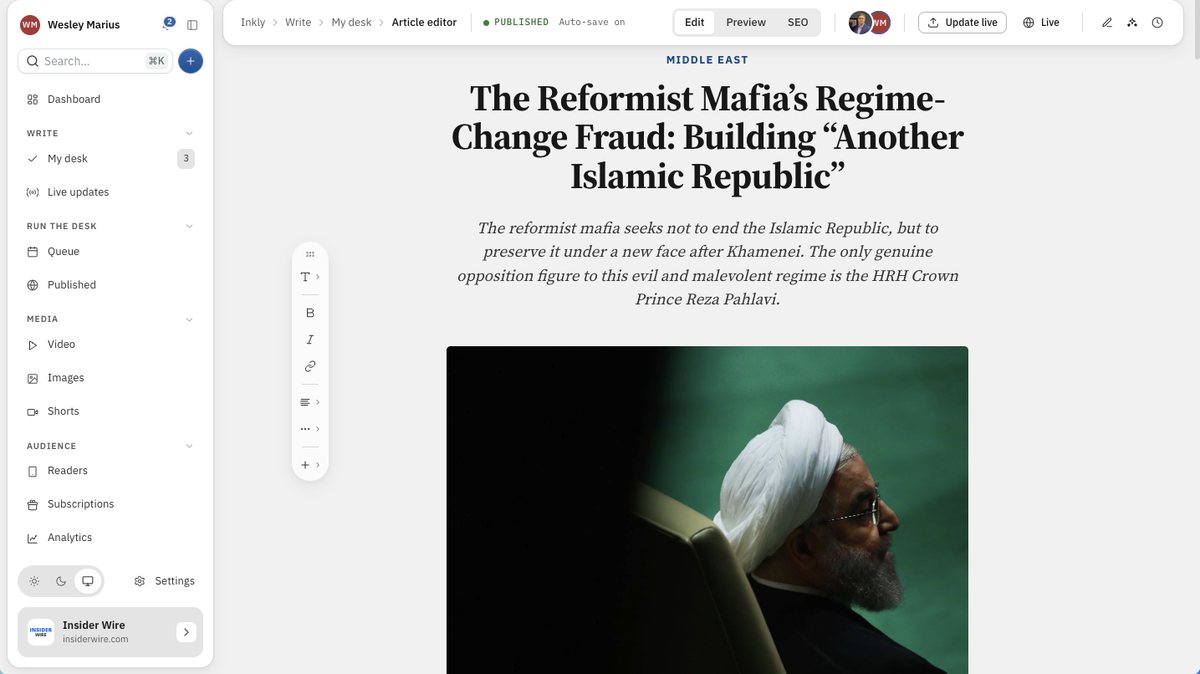
app.inkly.news · Article editor
The Inkly article editor with a published story open: the newsroom sidebar, a breadcrumb and status bar, the floating formatting toolbar, and the story's kicker, headline, dek and cover photo in the canvas.
How it works

Write it, check it, publish it.

The same three steps your newsroom already follows. Inkly is what happens when the software stops getting in the way of them.

01. Write

A writing space built for stories.

Quotes, photos and embeds drop in from one menu. Your work saves as you type, so a closed laptop costs you nothing. Links you add are frozen at publish and cannot break later.

02. Edit together

One story, many hands.

You can see who else has a story open before you type over them. Saves are checked for conflicts, bylines can be shared, and an assignment lands on the writer’s desk with a due date on it.

03. Publish

Nothing goes out half finished.

A checklist holds the publish button until the headline, cover, alt text and section are all there. You can read the Google result before it exists, and set a story to go at a given minute.

Inside the desk

Built in a working newsroom, not a demo.

Every screen below is the real product, running a live news site. It has since taken on a second newsroom without changing shape.
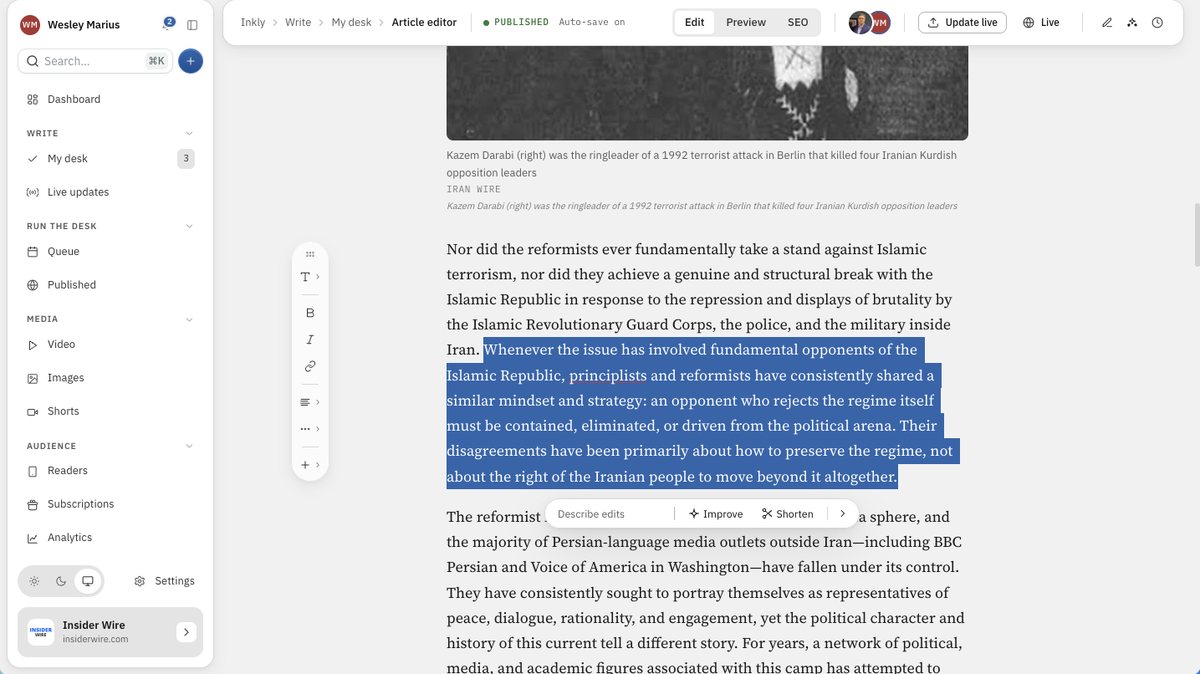
Article editor · Assist
A passage selected in the Inkly editor with the inline assist bar open beneath it: a Describe edits field, an Improve button and a Shorten button.
Assist

AI that proposes, and never overwrites.

Select a passage and a bar appears under it. Improve, Shorten, Explain, Change tone, Fix grammar, or type the change you want in your own words. The rewrite streams in where the passage sits, and you Keep it or Discard it. Nothing reaches the story until you keep it.
  • A side panel drafts headlines, deks and tags too
  • One action fills the dek, SEO title, description and tags
  • Everything else it does is read-only, on purpose
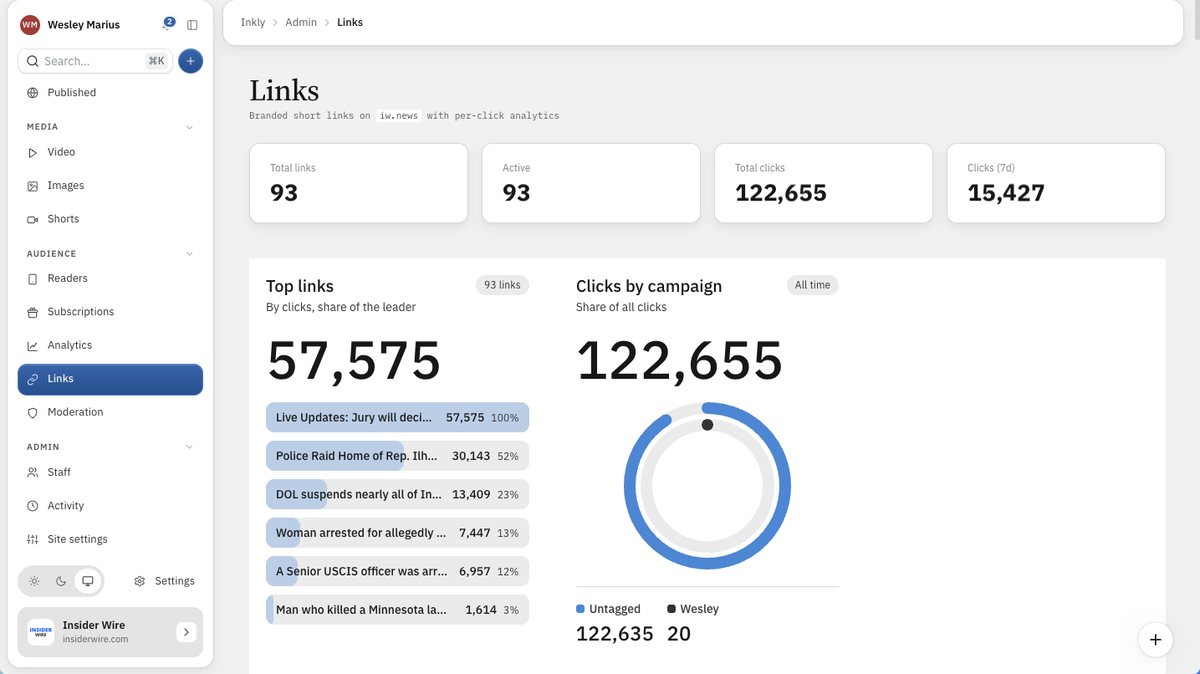
Admin · Links
The Inkly Links screen: counters for total links, active links and clicks, a ranked list of top links by clicks, and a clicks-by-campaign ring chart.
Short links

Your own short domain, with the clicks attached.

Mint links on your newsroom’s own domain rather than someone else’s. Every link counts its clicks, and tagging one with a campaign puts it in the share-of-traffic ring. Links with no tag are folded into their own slice instead of being dropped, so the chart always adds up.
  • Pick the code yourself, or take a random one
  • Internal-only labels, never shown to a reader
  • Codes are unique across newsrooms, so a link cannot cross mastheads
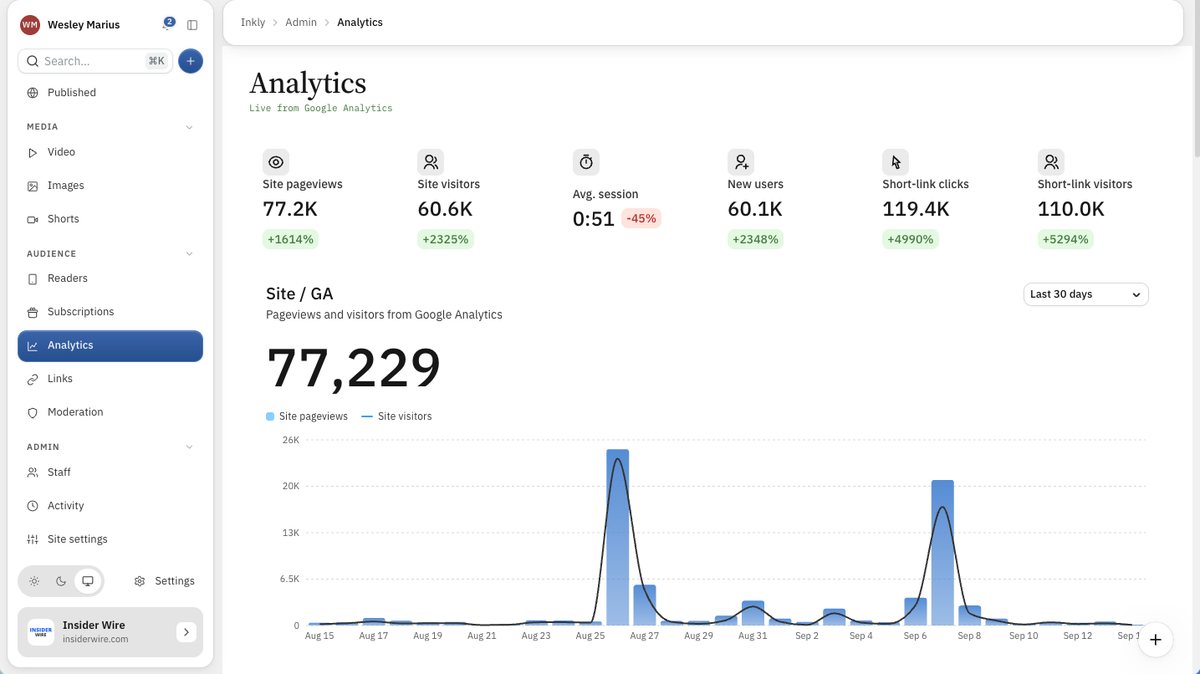
Admin · Analytics
The Inkly Analytics screen: tiles for site pageviews, visitors, average session, new users and short-link clicks, above a thirty-day pageviews chart.
Analytics

Site traffic and link traffic on one screen.

Pageviews, visitors, new users and session length from Google Analytics, sitting beside the click counts from your own short links. The two numbers that usually live in two different tools are read in one place, over the window you choose.

  • Each figure carries its change against the last period
  • Most Read on the site is ranked by your own first-party views
  • Per-story click analytics on every short link
How it ships

Your site stays up even when the desk does not.

Inkly serves one read API, and a site can take it two ways. Render on request, the way InsiderWire does, or fetch at build time and publish flat files, the way ARX TV does. The second keeps serving every story, image and feed even if the desk, its database or its host goes dark.

Same stories either way. The publisher chooses, and can change the choice later without anyone rewriting a story.

Everything on the desk

The whole newsroom, not just the writing.

A newsroom is more than an editor. This is what else is in here, in the words the people using it would use.

Writing

The story itself

  • Headline, dek and cover in the canvas, everything else in a panel
  • Quotes, photos, embeds and pull-quotes as blocks
  • Saves as you type, with a revision history behind it
  • Conflict-checked saves when two people are in one story
Getting published

Review and the Queue

  • Six statuses: draft, in review, scheduled, published, live, archived
  • A checklist that holds the button until the story is dressed
  • Schedule to the minute; it goes on its own
  • A story is public only when published or live. Never otherwise
Live coverage

Live blogs

  • Four kinds of entry: update, quote, pull-quote and photo
  • Coloured tags for breaking, analysis, markets and official
  • Pin the entry that matters; every entry gets its own link
  • When it settles, convert the coverage into an article
Pictures and clips

The media libraries

  • An image library and a video library, both searchable
  • Alt text, caption, credit and category on every picture
  • Shorts: vertical clips that never list as articles
  • Covers are checked for size before they can go out
The front page

What leads

  • Recency, with one story pinned as the lead
  • Set it from the story itself: Standard, Feature or Lead
  • Only the newest Lead is pinned, so a stale one cannot block the news
  • A new lead reaches readers in about a minute
Search and social

How it looks outside

  • A live Google preview, with counters before a title is cut off
  • Structured data and news sitemaps, by construction
  • Search engines are told the moment you publish
  • Writer profiles become author pages with their own markup
Your readers

Accounts and subscriptions

  • A reader directory, with banning and unbanning
  • Premium stories behind a real paywall
  • Subscriptions, including gifting one
  • Push notifications to readers who asked for them
Comments

Moderation

  • A queue for reader comments, with flags surfaced
  • Remove a comment, and restore one you removed
  • Ban a commenter from the comment itself
Who can do what

Staff and roles

  • Six roles, from Admin down to Contributor, enforced on the server
  • Guest contributors: a real byline with no login at all
  • Two-factor sign-in, and invitations rather than sign-ups
  • An activity log of who changed what
Interactive · no account needed

Sit at the desk and try it.

A small version of the Inkly writing space, running here on the page. Type into the story, change a paragraph style, format your words. It answers as you go.

Inkly › Compose › Article editor Draft Saved · auto
The Craft

The Quiet Return of the Front Page

Why independent newsrooms are falling back in love with editions, deadlines, and deciding what leads

For a decade the feed decided everything. Stories arrived in reverse order of their posting, and the oldest tool in the newsroom, the judgment of an editor, was quietly retired.

Now the front page is coming back. Small newsrooms are rediscovering that a considered page, assembled by people who read every word, is the product readers actually miss.

Editing is choosing

A front page is an argument about what matters. It cannot be automated away, because its value is precisely that someone chose it, and signed their name to the choice.

“The feed tells you what is new. A front page tells you what is important.”

The tools are catching up at last. What desktop publishing once did for print, a new generation of newsroom software is doing for the open web.

Now opening the first seats

Start your publication.

Inkly is opening to a first group of independent publishers, on the same system that runs InsiderWire. Add your email and we will be in touch as seats open.

Invite-only early access · Running in production at insiderwire.com · inkly.news